OnSTAGE by Teach BIG

Practice that looks like the state test. Reports that tell you exactly what to teach next.

OnSTAGE gives your students reading, editing, and revising practice in the format they will meet on STAAR/SST, then turns every answer into a clear next step for you.

Buy OnSTAGE, $149 for one yearBook a demoSign in to OnSTAGE

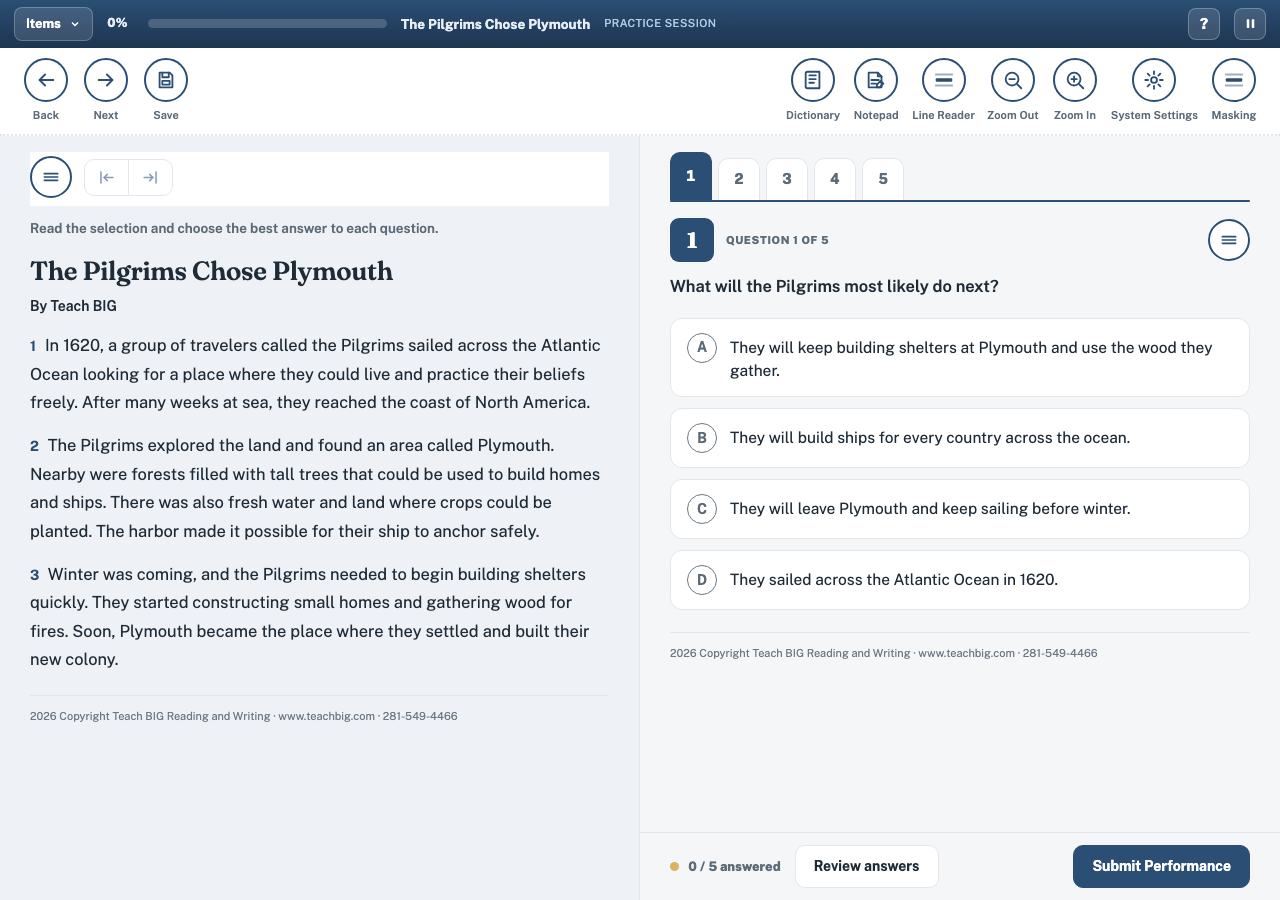
Student test view in OnSTAGE showing a Teach BIG passage beside multiple choice questions and test day tools
The student sitting in OnSTAGE, built to feel familiar on test day.

The problem OnSTAGE solves

Practice that does not match the test

Worksheets and one off passages rarely mirror the real sitting. Students meet new tools, new layouts, and new question styles on the one day it counts.

Scores that stop at a percentage

A percent correct tells you who passed and who did not. It never tells you why a wrong answer tempted your students, or which TEKS to reteach on Monday.

Planning time lost to hunting

Building passage sets, sorting students into groups, and writing the next lesson from raw scores eats the planning period you need for teaching.

OnSTAGE closes all three gaps at once. Students practice in a sitting that resembles the state test. Every response is scored by TEKS points. And each report ends at the same place: the next instructional step, named for you.

Build practice from TEKS aligned passages

Start from the passages and clusters that match what you teach. Choose the passage set, pick the month and cluster, and shape reading, editing, and revising practice around the TEKS your scope calls for.
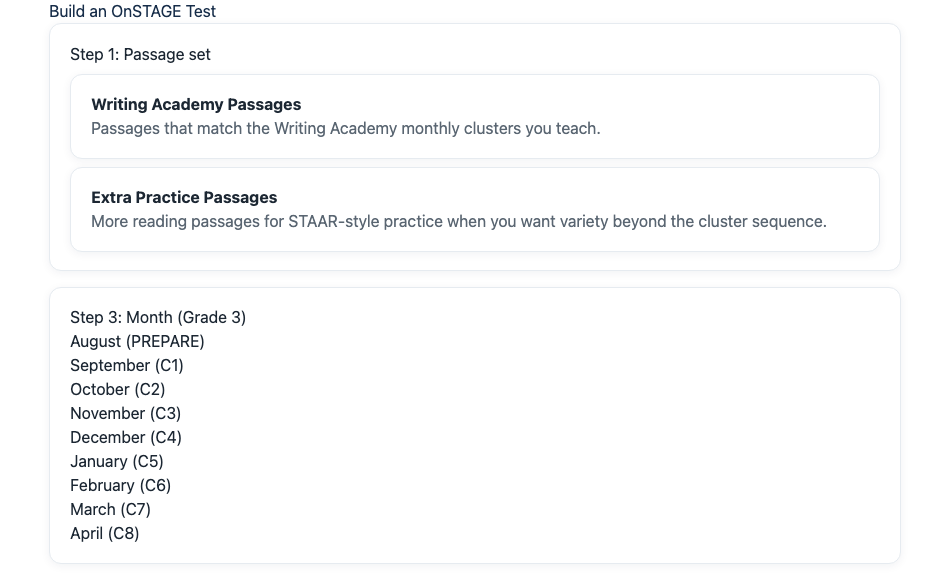
  • Passage sets matched to monthly curriculum clusters
  • Reading, paired passage, editing, and revising sets in one flow
  • Stamina levels that grow readers toward full test day length

Request a demoSign in to OnSTAGE

Assignment builder in OnSTAGE showing passage set choices and cluster months for Grade 3

Assign sets in minutes, whole class or small group

Link practice sets into one sitting and assign to the whole class or to chosen students. Students move from set to set without starting over, and you keep teaching instead of managing logins and paper.
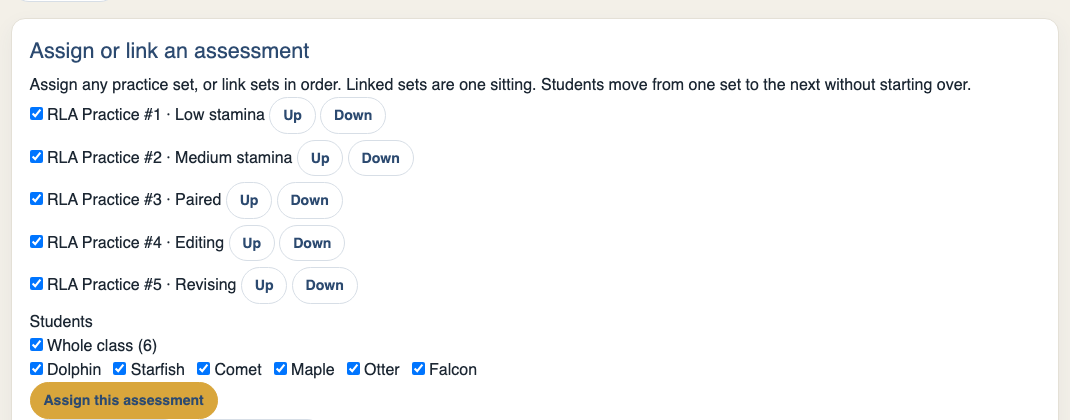
  • Any practice set, or several sets linked in order as one sitting
  • Whole class assignment or targeted assignment by student
  • Reading, editing, and revising sets assigned together

Request a demoSign in to OnSTAGE

Assign screen in OnSTAGE linking five RLA practice sets into one sitting for the whole class

A student test experience that builds test day confidence

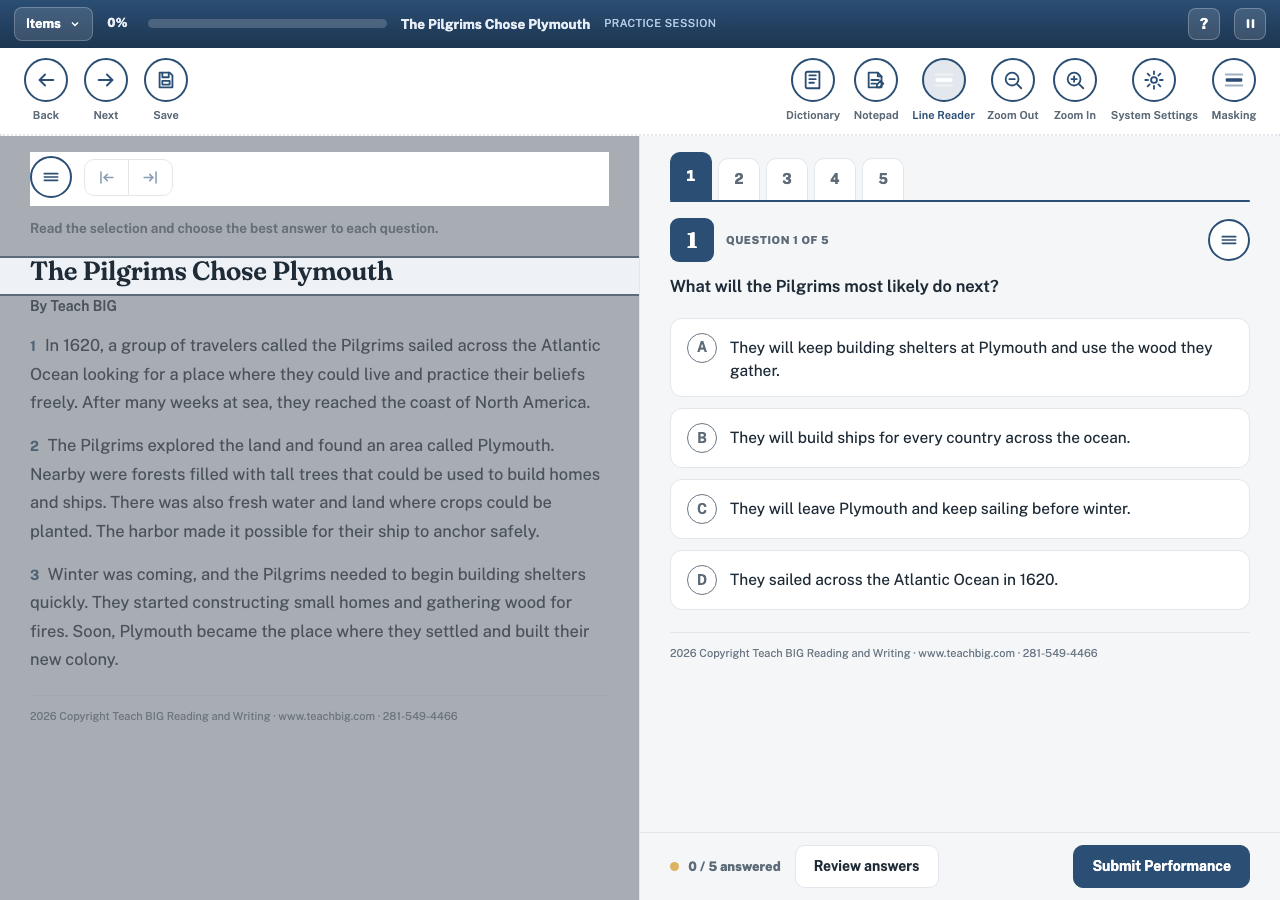
Students read the passage on the left and answer on the right, just as they will on STAAR/SST. Dictionary, notepad, line reader, zoom, and masking tools sit where students expect them, so practice builds calm, capable test takers.
  • Passage and questions side by side, like the real sitting
  • Line reader, masking, zoom, dictionary, and notepad built in
  • Progress tracking and review before students submit

Request a demoSign in to OnSTAGE

Student test view in OnSTAGE with the line reader tool guiding reading across a Teach BIG passage

Passage Info: know every text before you teach it

Each passage carries a full Passage Info sheet. Genre, word count, stamina level, TEKS assessed, vocabulary to preteach, and a summary sit on one page, so you can plan questions and supports before the first student reads a word.
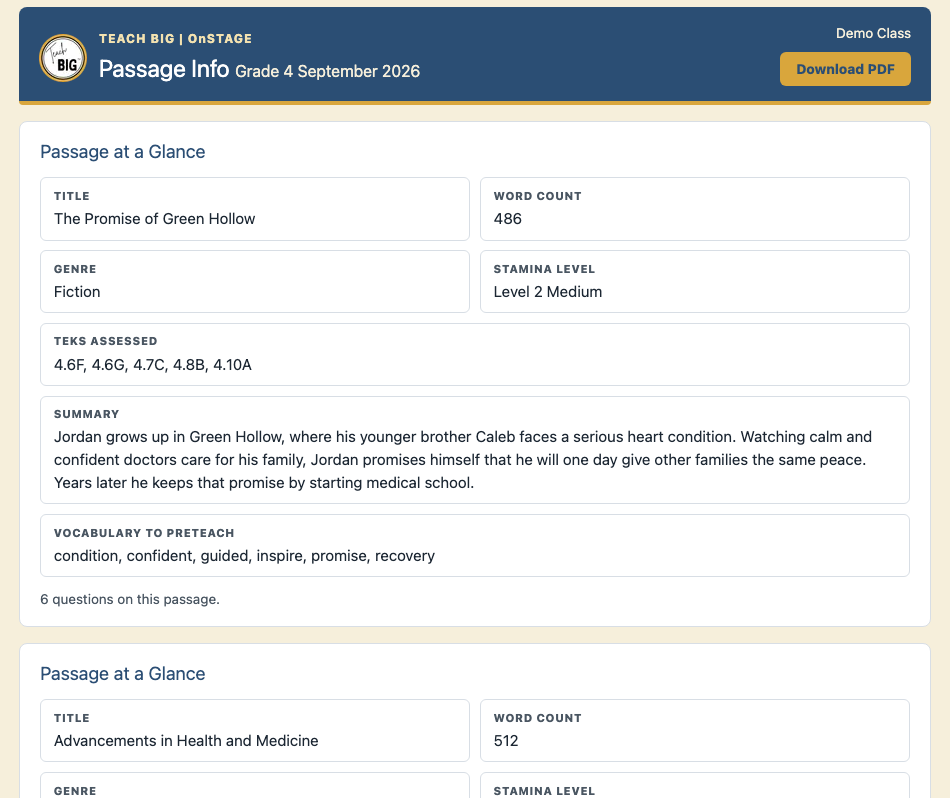
  • Word count, genre, and stamina level at a glance
  • Vocabulary lists ready for preteaching
  • Teacher notes space for reteach, small group, and extension plans

Request a demoSign in to OnSTAGE

Passage Info report in OnSTAGE for a Grade 4 fiction passage with word count, TEKS assessed, summary, and vocabulary to preteach

Answer Choice Analysis: why wrong answers are wrong

OnSTAGE names the trap inside every tempting wrong answer. Overreach, contradicted inference, true but irrelevant, topic only: each distractor family tells you the exact misconception to address in your next lesson.
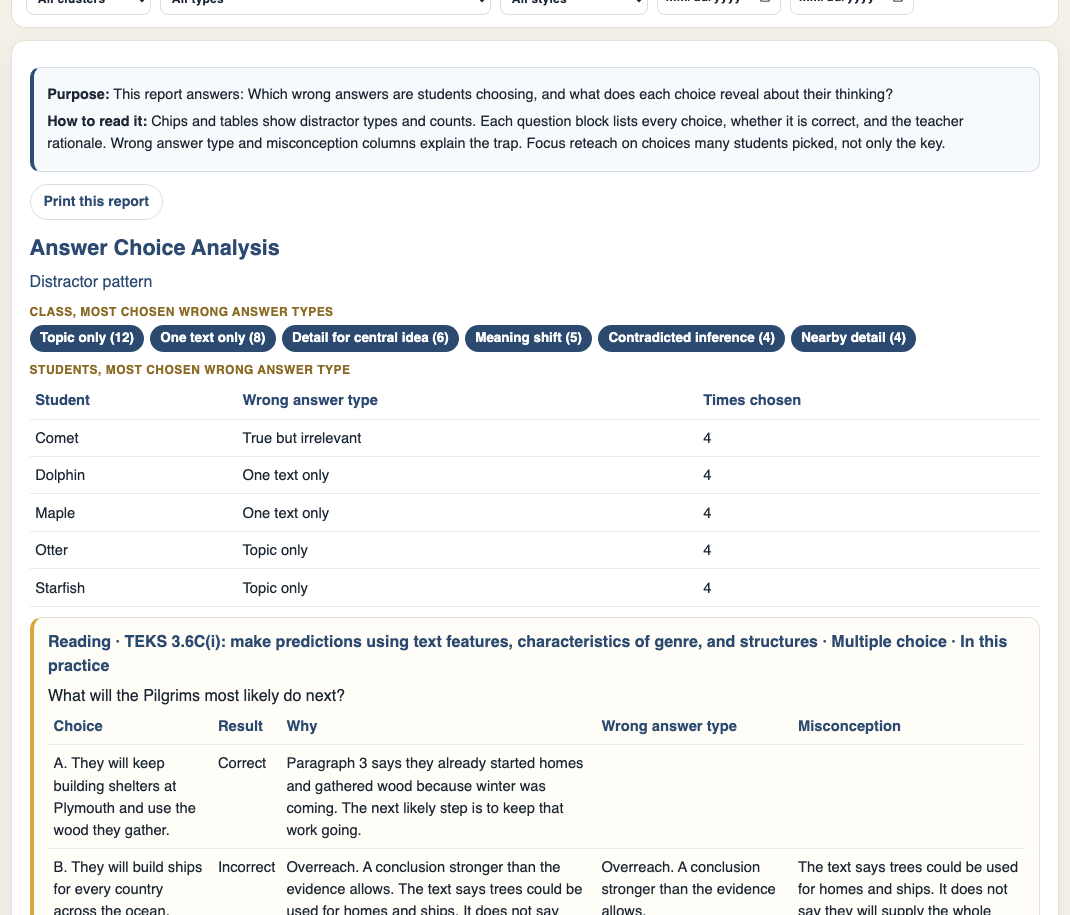
  • Every choice labelled correct or incorrect with the reason why
  • Distractor families ranked so you see the class pattern fast
  • Reteach aimed at the thinking error, not just the right letter

Request a demoSign in to OnSTAGE

Answer Choice Analysis in OnSTAGE explaining why each answer choice is correct or incorrect and naming distractor types

TEKS points report: mastery measured in points and opportunities

Percent correct sits beside the number of opportunities and the points earned for every TEKS. One lucky answer never looks like mastery, and the TEKS that need a closer look stand out at a glance.
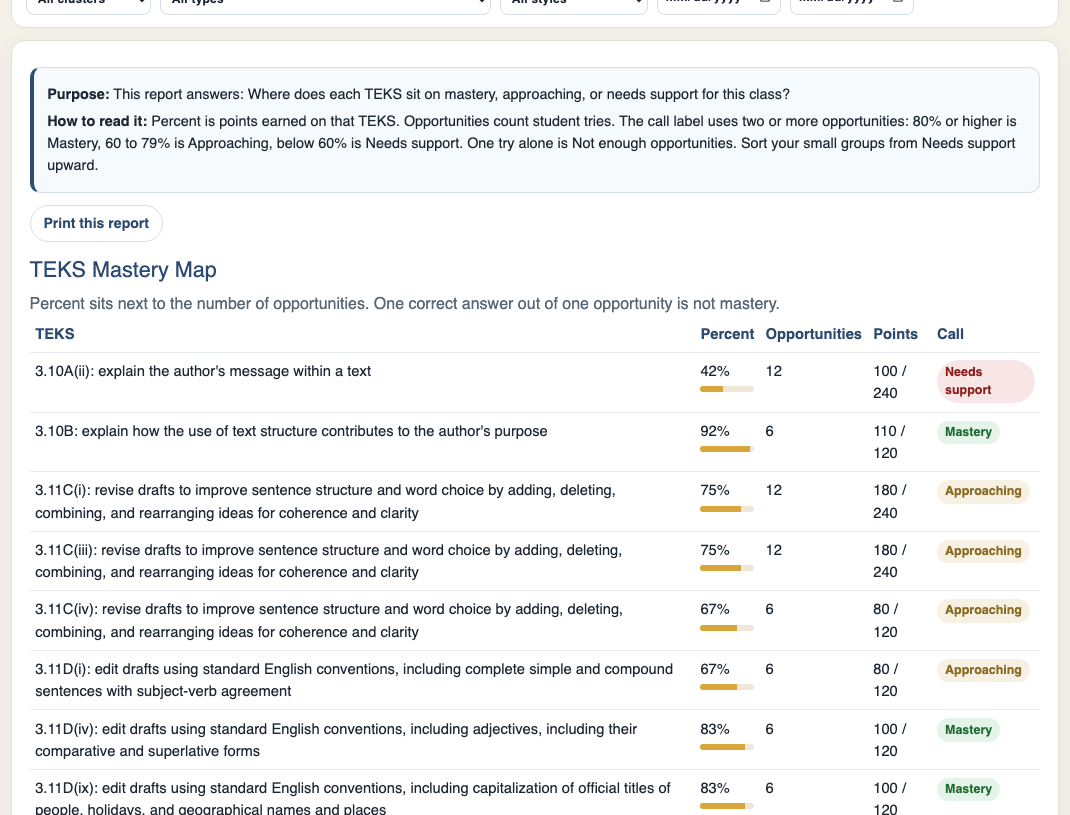
  • Percent, opportunities, and points side by side for each TEKS
  • Strengths and needs sorted for fast PLC and planning talks
  • Filters by student, TEKS, cluster, passage type, and date

Request a demoSign in to OnSTAGE

TEKS Mastery Map in OnSTAGE listing each TEKS with percent correct, number of opportunities, and points earned

TEKS Teams: small groups formed and lesson ready

OnSTAGE groups students who missed the same TEKS and hands you the lesson card for that group. Objective, misconception, a short routine, discussion stems, and resource links arrive together, ready to print and teach.
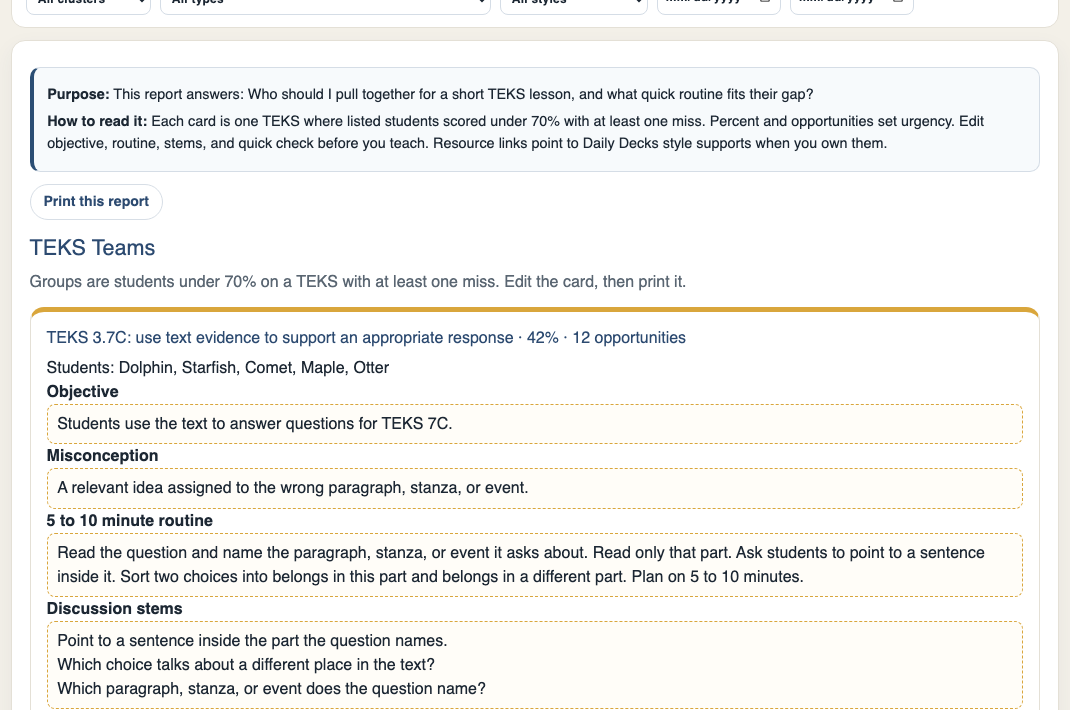
  • Groups formed from real misses on each TEKS
  • A five to ten minute routine written for every team
  • Printable lesson cards with discussion stems included

Request a demoSign in to OnSTAGE

TEKS Teams in OnSTAGE grouping students below 70 percent on a TEKS with an objective, misconception, routine, and discussion stems

Class and student reports that name the next step

Class at a Glance shows strengths and the TEKS that need a closer look for the whole room. Student Progress Profiles and My Next Best Step turn that picture into one clear move per reader, so conferences and small groups start with purpose.
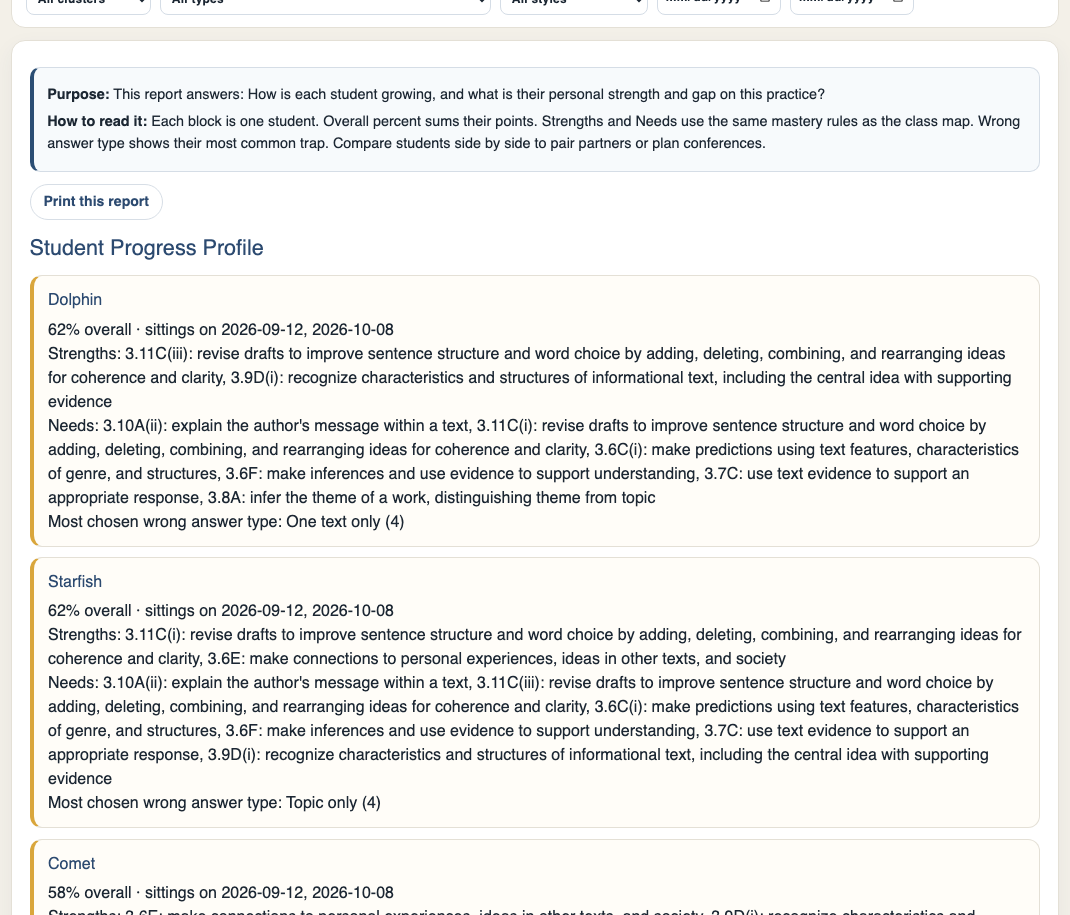
  • Whole class strengths and needs on one screen
  • Per student strengths, needs, and most chosen distractor
  • A named next step for every student after every sitting

Request a demoSign in to OnSTAGE

Student Progress Profile in OnSTAGE showing per student percent, strengths, needs, and most chosen distractor type

My Next Best Step: the reteach, already drafted

After each sitting, every student receives a strength to celebrate and a next practice target written in plain language. Teachers open one screen and know exactly who needs what on Monday morning.
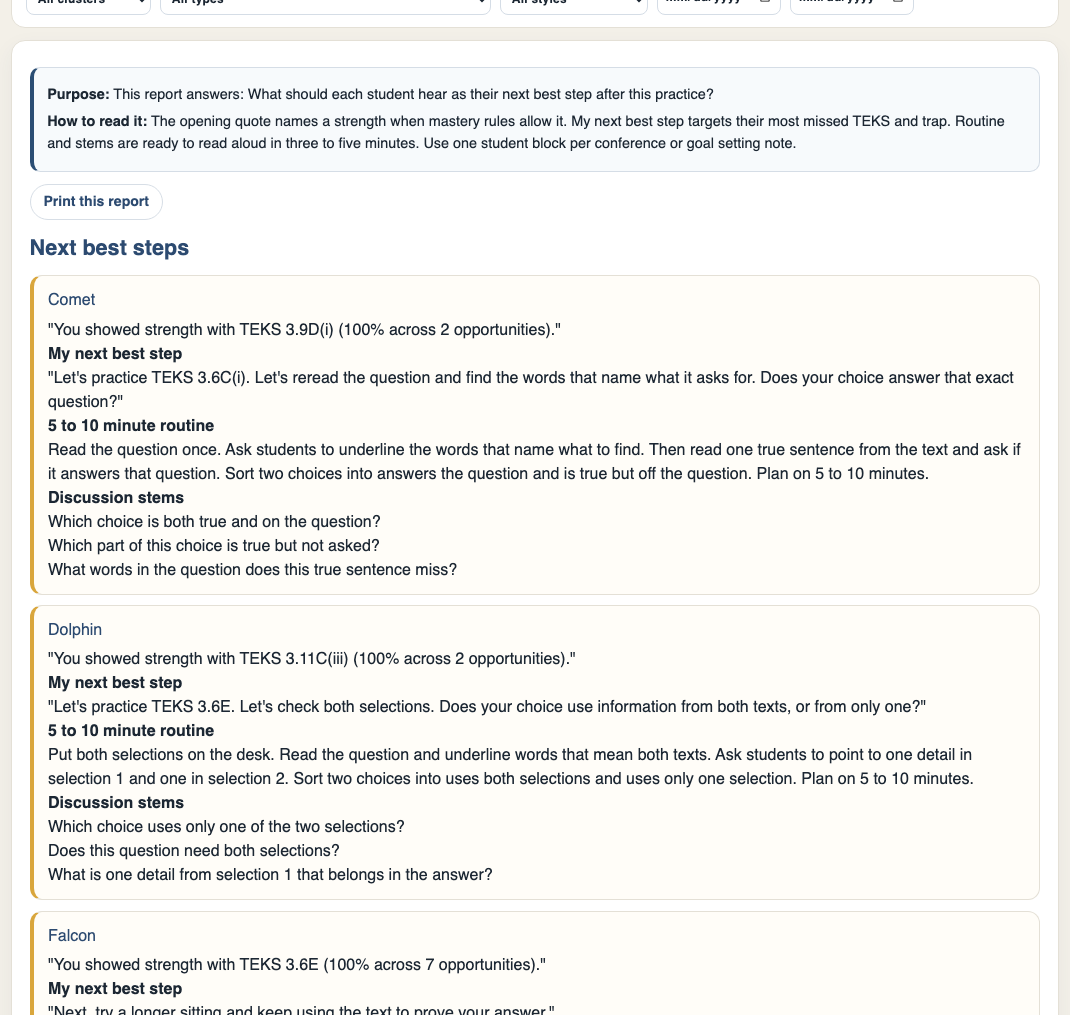
  • One strength and one next target per student
  • Targets written from the TEKS and traps in the data
  • Ready to share in conferences and progress talks

Request a demoSign in to OnSTAGE

My Next Best Step report in OnSTAGE naming a strength and the next TEKS practice target for each student

Class at a Glance for leaders and teams

Campus leaders and grade level teams see the same honest picture teachers see. Points earned across practice sets, TEKS strengths, and the standards that need attention, ready for data talks that end in action.
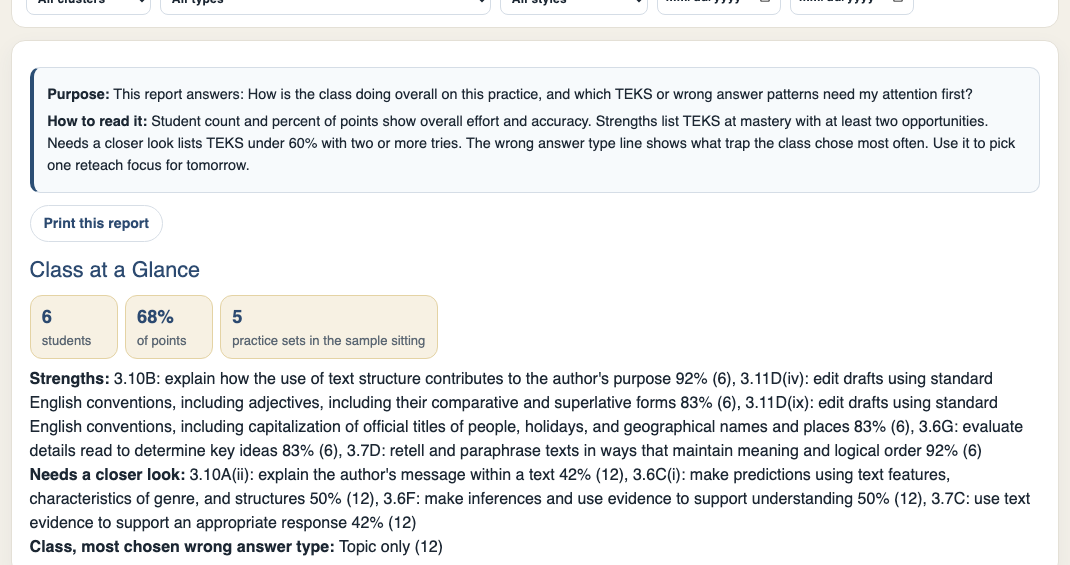
  • Class performance summarized across every practice set
  • TEKS strengths and needs ranked for team planning
  • Filters that match how campuses review data

Request a demoSign in to OnSTAGE

Class at a Glance report in OnSTAGE summarizing class points, TEKS strengths, and TEKS that need a closer look

Download Passage Info and TEKS Breakdown reports as PDFs for your plan book, family conferences, and campus data meetings. Print TEKS Teams lesson cards and take the reteach straight to your small group table.
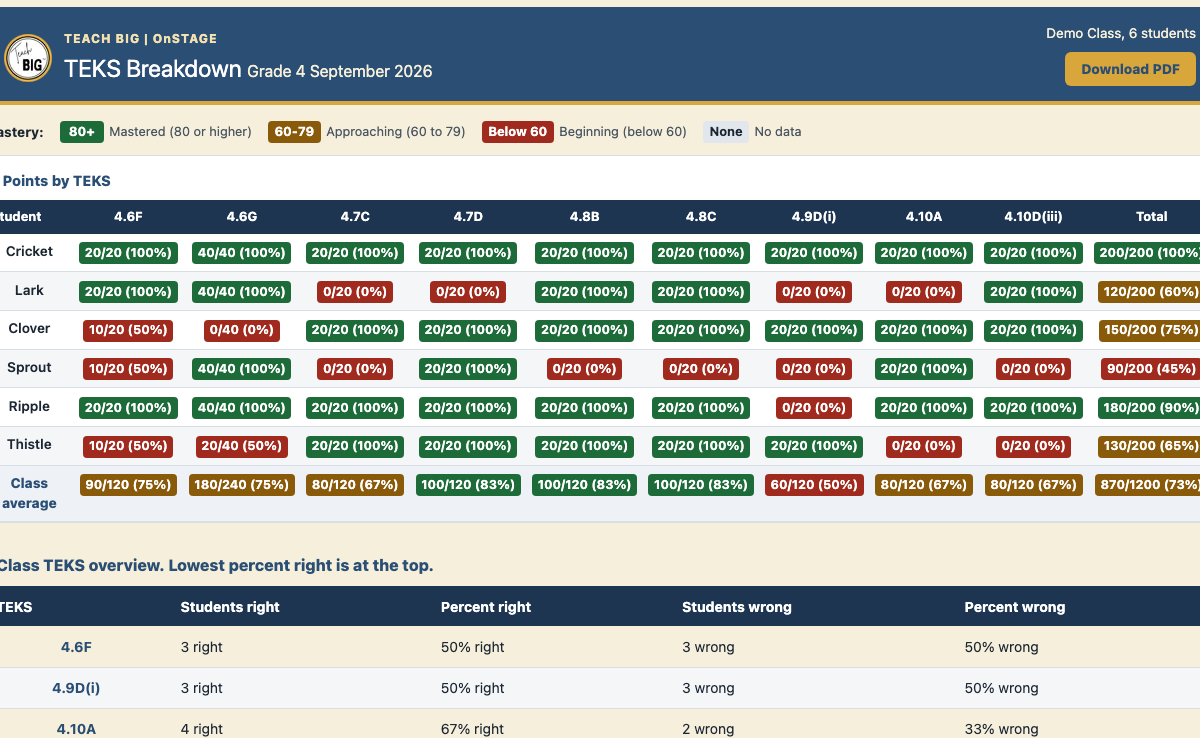
  • One click PDF download on teacher reports
  • Printable lesson cards for small group reteach
  • Clean pages that read well in print and on screen

Request a demoSign in to OnSTAGE

TEKS Breakdown report in OnSTAGE ready to download as a PDF for printing and planning

Built for every level of your campus

For teachers

  • Practice built and assigned in minutes
  • Reports that name the next instructional step
  • Small group lessons formed from real student data
  • Zero added grading

For campus leaders

  • TEKS strengths and needs visible across classrooms
  • Data talks grounded in points and opportunities
  • Reteach plans you can see, support, and celebrate
  • One shared picture of reading growth

For districts

  • Consistent STAAR/SST format practice at every campus
  • TEKS aligned passages across grades and clusters
  • Comparable reports for planning support where it counts
  • Part of the Teach BIG family serving grades 2 to 10

Questions, answered

Does OnSTAGE replace my reading curriculum?

No. OnSTAGE is the practice and reporting layer that sits beside the lessons you already teach. You build practice from TEKS aligned passages, assign it, and use the reports to plan the reteach your class needs next.

Will students recognize the format on test day?

Yes. The student sitting mirrors the state test experience, with a passage on one side, questions on the other, and tools such as a dictionary, notepad, line reader, zoom, and masking. Students walk in having already practiced in the format that counts.

How much grading does OnSTAGE add to my week?

None. Practice is scored for you, and the points flow straight into the TEKS reports. Your time goes to reading the reports and teaching the next step, not to marking papers.

Can campus leaders and districts see progress?

Yes. Class and student reports roll up by TEKS, cluster, and passage type, so leaders can see strengths, spot the TEKS that need a closer look, and support teachers with a shared picture of growth.

What grades does Teach BIG serve?

Teach BIG serves grades 2 to 10 across its family of tools. OnSTAGE passages and practice sets are built by grade level and cluster, so each reader meets text and questions at the right stretch.

Can I print reports for planning and conferences?

Yes. Reports such as Passage Info and the TEKS Breakdown download as PDFs, and TEKS Teams lesson cards print ready for small group teaching.

See OnSTAGE working with your students on your next TEKS.

Book a demo and we will walk your team through building a set, assigning it, and reading the reports together.

Buy OnSTAGE, $149 for one yearBook a demoSign in to OnSTAGE

Teach BIG pencil guyChat Now!
See Everything OnSTAGE Does | Teach BIG