Featured guide
Personalized RLA Assessment, Practice & Progress Monitoring
Assess with purpose. Practice with confidence. Teach with direction.
Relieving stress. Raising scores.
Welcome to OnSTAGE!
What if assessment did more than tell you how many questions your students answered correctly?
What if every assessment helped you identify exactly what your students understand, where they are struggling, why they may have selected an incorrect answer, and what you can do next to help them succeed?
That's the vision behind OnSTAGE!
OnSTAGE is a customizable, TEKS-aligned reading language arts assessment and practice platform designed to put teachers in control of how, when, and what their students practice.
Rather than requiring every student to complete the same lengthy assessment, OnSTAGE allows teachers to build purposeful practice experiences that align with their current instruction, students' needs, and desired assessment goals.
But the real power of OnSTAGE begins when students finish.
Through detailed answer-choice analysis, individual and class performance reports, automatically suggested TEKS Teams, and direct connections to instructional resources, OnSTAGE helps teachers transform assessment results into actionable instruction.
With OnSTAGE, assessment isn't simply about discovering what students know. It's about knowing what to teach next.
1. Five Purposeful RLA Practice Experiences
OnSTAGE offers five distinct assessment experiences that teachers may assign independently or combine to create more comprehensive assessments.
| Practice | Instructional Focus | Questions |
|---|---|---|
| RLA Practice #1 | Reading Comprehension: Teacher-selected passage and TEKS | 5 |
| RLA Practice #2 | Reading Comprehension: A second teacher-selected passage and TEKS | 5 |
| RLA Practice #3 | Paired Passages: Comparing, contrasting, and connecting two texts | 5 |
| RLA Practice #4 | Editing: Grammar, capitalization, punctuation, and usage | 5 |
| RLA Practice #5 | Revising: Improving sentence construction, organization, and clarity | 5 |
| Complete Linked Practice | All five practice experiences combined | 25 |
Teachers can assign one practice set for a focused instructional check or link multiple sets for a longer, more comprehensive practice experience.
RLA Practice #1 and #2: Reading Comprehension
You choose the passages. You choose the standards. OnSTAGE builds the practice.
Teachers select the curriculum cluster, module, and passage they want students to read.
OnSTAGE then displays the eligible reading comprehension TEKS from strands 6 to 10, determined by the student's grade level and the passage's genre.
The teacher selects five TEKS to assess, and OnSTAGE assembles five corresponding questions.
Teachers may create a second five-question reading assessment by choosing another available module and passage.
Reading questions use STAAR/SST-style formats and carefully constructed answer choices that assess students' understanding rather than simply their ability to recognize familiar vocabulary.
RLA Practice #3: Paired Reading Passages
Two passages. Multiple connections. Deeper comprehension.
Students read two related passages and respond to five questions aligned with TEKS 6E.
These questions require students to use information from both passages as they compare and contrast characters, settings, concepts, events, relationships, and other meaningful text features.
Students learn to move beyond understanding each passage independently and begin recognizing the relationships between them.
RLA Practice #4: Editing
Five focused opportunities to demonstrate command of written language.
Teachers select a curriculum cluster, and OnSTAGE provides a five-question editing practice based on an intentionally edited paragraph connected to that cluster's passages.
The five questions address:
- Capitalization
- Punctuation
- Subject-verb agreement
- Adjective usage
- Pronoun usage
Students identify and correct language errors through grade-appropriate, STAAR/SST-style questions.
RLA Practice #5: Revising
Good writers don't just write. They improve what they've written.
This practice features a passage-based paragraph that students must examine for opportunities to strengthen clarity, meaning, and organization.
Students encounter five purposeful revision questions:
- Combining sentences
- Adding information
- Rearranging ideas
- Deleting unnecessary information
- Combining sentences
These questions help students recognize how purposeful revision improves the effectiveness of written communication.
2. Flexible Assessment Length: Practice Today, Build Endurance for Tomorrow
OnSTAGE recognizes that students need opportunities to develop confidence and stamina gradually.
A lengthy assessment is not always the most effective starting point.
That's why teachers have the flexibility to LINK practice sets together.
- Early in the school year: A teacher might assign only RLA Practice #1 to focus on five specific reading comprehension standards.
- As instruction progresses: The teacher might link RLA Practice #1 and RLA Practice #2, creating a seamless 10-question reading practice.
- When developing paired-reading endurance: The teacher might link RLA Practices #1, #2, and #3, providing 15 reading comprehension questions.
- When targeting writing conventions: The teacher might link RLA Practices #4 and #5, creating a 10-question editing and revising experience.
- As state assessment preparation approaches: The teacher can link all five practices into one cohesive, 25-question RLA assessment designed to provide an extended STAAR/SST-style practice experience.
Students progress through the linked practice sets without needing to open separate assessments.
The result: a flexible approach that grows with students rather than overwhelming them.
Teacher Instructions: How to Use OnSTAGE
Step 1. Access Your Teacher Dashboard
Sign in and open your OnSTAGE teacher dashboard. The top menu holds Dashboard, Passages, OnSTAGE, Class roster, Accommodations, and Reports.
Your dashboard serves as the central location for selecting assessment content, assigning practice, viewing reports, and identifying instructional next steps.
Confirm that your student roster and grade-level information are accurate.
OnSTAGE is designed for Grades 3, 4, and 5, with assessment questions and content aligned to each respective grade level.
Step 2. Identify Your Instructional Focus
Consider the standards you are currently teaching and the skills you want to assess.
OnSTAGE connects to The Writing Academy® curriculum through Curriculum Connection.
The assessment library uses Clusters 1 to 7. The PREPARE Cluster and Cluster 8, the research cluster, are excluded from OnSTAGE assessment selection.
Teachers do not have to follow the clusters in numerical order or align them with specific months of the school year.
The Build an OnSTAGE Test page offers two paths. Curriculum Connection uses the clusters above. Explore More uses social studies and science passages, one school month at a time, newest first.
This flexibility makes OnSTAGE useful alongside a school's existing core RLA curriculum and scope and sequence.
Step 3. Build Your Reading Comprehension Practice
To create RLA Practice #1 or #2:
- Open Build an OnSTAGE Test and choose Curriculum Connection.
- Select your grade level (3, 4, or 5).
- Choose a cluster from Clusters 1 to 7.
- Select the module you want (Module 1 is low stamina, Module 4 is very high stamina).
- Choose one passage. All five questions in the practice use that passage.
- For each question, select one of the TEKS OnSTAGE makes available for that passage type. Each TEKS can be used once in the practice.
- Review your five-question reading comprehension practice.
Each cluster contains two passage threads connected across four modules, with passage options designed to develop progressively greater reading stamina.
The progression moves from lower-stamina reading demands toward very-high-stamina demands.
This structure helps teachers match practice to instructional needs while gradually increasing students' independence and endurance.
Important: Only standards appropriate to the selected passage type are available. For example, a question about the structural characteristics of drama will not appear as an option for a purely informational passage.
Step 4. Add Paired Reading, Editing, or Revising Practice
To include RLA Practice #3, build RLA Practice #2 first. Practice #3 uses the same module as Practice #2, with its two paired passages and five paired questions. Tick Include RLA Practice #3 on the Paired step. On Explore More, the paired passages are set for the month.
To include RLA Practice #4, choose a cluster. OnSTAGE supplies the five corresponding editing questions. You do not need to select a module or individual editing TEKS.
To include RLA Practice #5, choose a cluster. OnSTAGE supplies the five corresponding revising questions. Again, module and individual question selection are not required.
These preassembled practices allow teachers to assess essential skills without needing to construct every question independently.
Step 5. Determine Your Assessment Length
Decide whether students will complete one practice set or several linked sets.
If you want a shorter assessment, select one five-question practice.
If you want a longer assessment, go to the Assign step, check the practices you want, and put them in order with Up and Down.
OnSTAGE can connect all five practices for a complete 25-question experience.
Linked practices run as one sitting. Students move from one set to the next without starting over.
Step 6. Set Individual Student Accommodations
Before assigning an assessment, review the accommodation settings for students who need them.
OnSTAGE is designed to support accommodations corresponding to those available through the state assessment system.
Turn on accommodations from Accommodations in the top menu, or from a student's report page. Students cannot turn them on themselves.
Only accommodations permitted for each student and applicable assessment situation should be enabled.
The goal is to create an assessment experience that accurately measures students' knowledge while providing the necessary access and support.
Step 7. Review Your Passage Info Sheet
One of the most valuable teacher resources within OnSTAGE is the Passage Info Sheet.
Every reading passage has a corresponding information sheet that helps teachers understand the content and instructional possibilities of the text.
The sheet identifies:
- Passage title, grade, cluster, module, and stamina level
- Genre or passage type
- Total number of words and paragraphs
- Ten important vocabulary words
- Ten possible spelling words
- Academic and content specific vocabulary, with context clues or word parts
- Point of view for fictional passages
- Text structure or organization for nonfiction passages
- Overarching theme or central idea
- Two supporting pieces of textual evidence
- Two possible inferences and the evidence supporting each
The Passage Info Sheet provides teachers with useful information for planning instruction, previewing vocabulary, preparing targeted lessons, and facilitating meaningful discussions.
It can be used before the assessment to plan instruction or afterward to identify opportunities for reteaching.
Step 8. Assign Practice to Your Students
Once your assessment is ready, select the students who will receive it, then choose Assign this assessment. Print a student copy or an answer key from the same step.
Teachers can assign practice to:
- An individual student
- Several selected students
- The entire class
This flexibility allows OnSTAGE to serve multiple instructional purposes.
A teacher may use a five-question assessment to check the understanding of a particular student, assign a targeted practice to a small group, or provide a linked assessment to the entire classroom.
Step 9. Students Complete Their OnSTAGE Practice
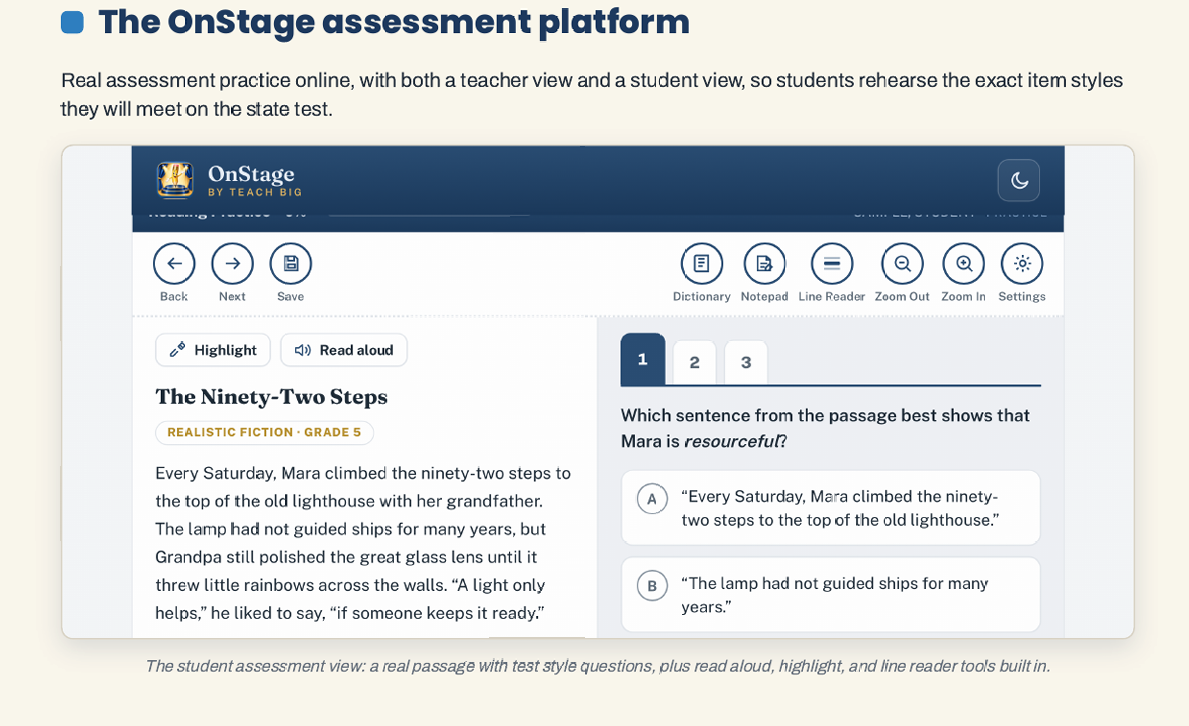
Students open their assigned practice and respond to the questions.
Depending on the question format, they may encounter:
- Multiple Choice: Four answer choices with one correct answer.
- Multiple Select: Five answer choices, with two correct selections required.
- Multipart Questions: A two-part question containing Part A and Part B, each with four answer choices.
Each complete question is designed to be worth 20 points.
For multipart questions, Part A and Part B are each worth 10 points.
For multiple-select questions, the two correct selections each carry a value of 10 points, subject to the platform's finalized partial-credit rules.
The experience is intended to familiarize students with the reasoning and response demands of STAAR/SST-style assessment questions.
Step 10. Examine Your Answer Choice Analysis
Knowing which answer a student selected is helpful. Understanding why that answer was tempting is even more valuable.
The Answer Choice Analysis tab gives teachers an instructional explanation of the questions and answer choices within the assigned practices.
For reading comprehension, the analysis includes each selected question and all answer choices.
For paired reading, editing, and revising, it includes the corresponding questions and choices assembled by OnSTAGE.
Every answer choice is identified as correct or incorrect and accompanied by an explanation.
For correct answers, teachers see the reasoning or textual evidence that makes the answer appropriate.
For incorrect answers, teachers see the distractor type, why the option is incorrect, and why it may have appealed to a student.
This allows teachers to address misconceptions instead of simply reviewing right and wrong answers.
For example, a student may select an answer containing accurate information from a passage that does not answer the specific question.
Another student may choose an inference that sounds reasonable but lacks sufficient textual support.
By examining these distinctions, teachers gain valuable insight into students' comprehension and test-taking reasoning.
Step 11. Review Performance Reports
Once students complete an assessment, OnSTAGE organizes their responses into meaningful reports.
Teachers can examine individual student performance and overall class performance, including which assessed TEKS students answered correctly and which TEKS were missed most frequently.
The Reports section includes Class at a Glance, TEKS Overview, TEKS Mastery Map, Student Progress Profile, Answer Choice Analysis, TEKS Teams, Reading Stamina Tracker, Resource Connections, and My Next Best Step.
These reports are designed to help teachers answer important instructional questions:
- Which standards do my students understand?
- Which standards are creating the greatest difficulty?
- Are particular misconceptions occurring across several students?
- Who needs additional support?
- Who is ready for more advanced challenges?
Rather than leaving teachers to interpret percentages alone, OnSTAGE connects assessment results with specific instructional needs.
Assessment identifies the need. TEKS Teams organize the response.
Step 12. Meet Your TEKS Teams
Assessment identifies the need. TEKS Teams organize the response.
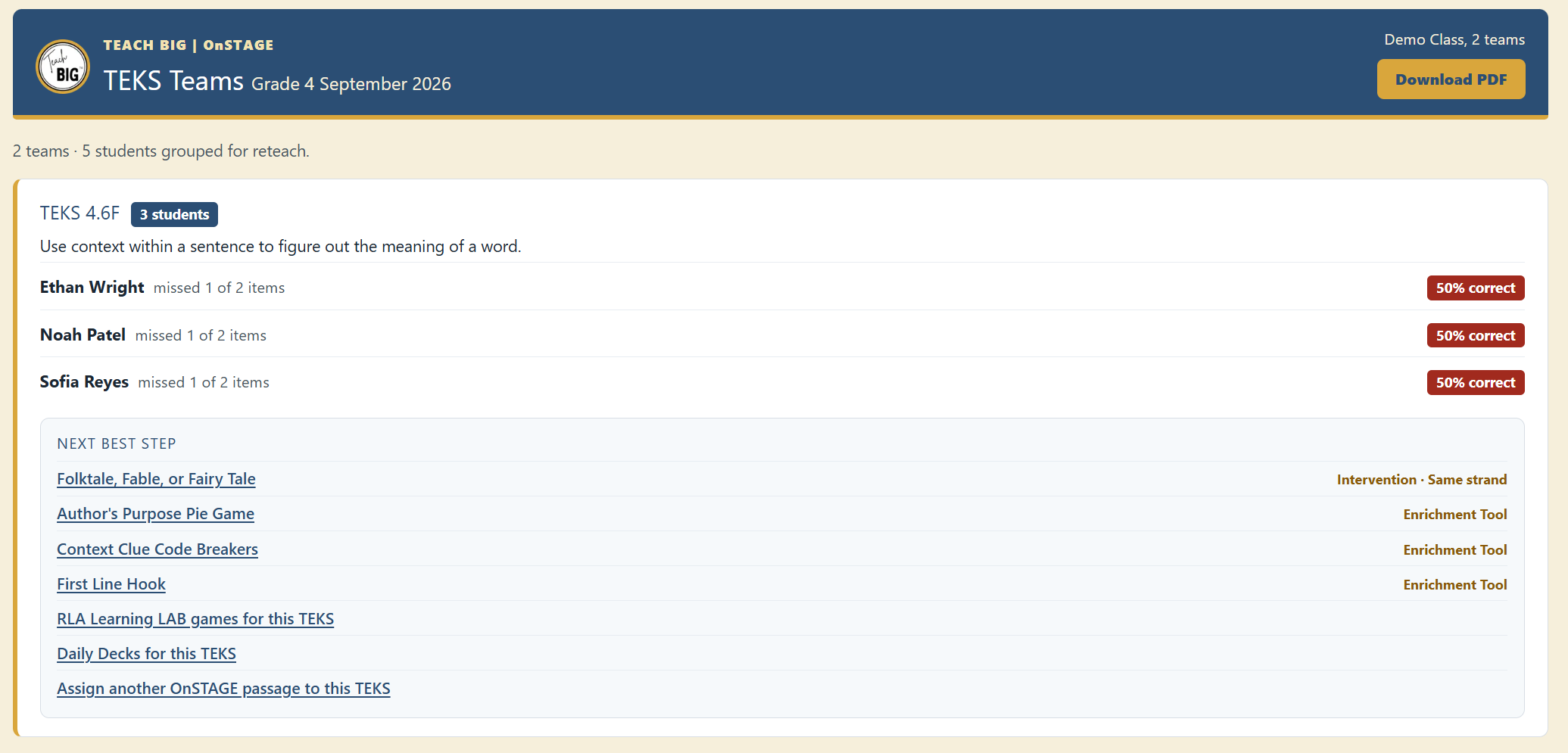
One of OnSTAGE's most powerful planned features is the automatic suggestion of small instructional groups called TEKS Teams.
Based on students' frequently missed standards, OnSTAGE identifies students who may benefit from working on similar skills.
Each suggested TEKS Team is accompanied by a concise explanation of its instructional need and practical next steps.
These recommendations help teachers decide what to reteach, how to approach the skill differently, and which resources may be most useful.
Teachers remain in control of their instructional grouping decisions.
Students who demonstrate strong understanding are also identified for appropriate enrichment and higher-level learning opportunities.
Step 13. Move Directly From Assessment to Instruction
OnSTAGE is designed to connect assessment results with the broader instructional resources available through The Writing Academy®.
For each identified instructional need, teachers can access recommended resources such as:
- TEKS-specific interventions
- Daily Slide Deck Triplets
- Interactive reading and writing practice
- Supplemental instructional books
- Targeted reinforcement experiences
- Enrichment resources for students demonstrating strong mastery
These recommendations are connected directly to the standards and skills revealed through assessment.
If the school or teacher already has access to the recommended resource, the corresponding link opens that resource.
If a resource is not included in their current purchase, OnSTAGE identifies it as an additional resource that may be purchased.
Teachers can therefore move from identifying a learning need to locating corresponding instructional support without having to search through unrelated materials.
Step 14. Coordinate Reading Assessment With Written Responses
Reading comprehension and written responses should not be treated as entirely separate instructional responsibilities.
The evidence students locate, the inferences they develop, and the relationships they recognize while reading all contribute to their ability to communicate effectively in writing.
OnSTAGE is designed to connect with TBASE, The Writing Academy®'s automated writing assessment and scoring platform.
Teachers can coordinate written constructed-response practice with the same clusters, modules, and passages used for reading comprehension.
The writing assessment experience includes corresponding response tools such as a visible character countdown, a passage-and-response layout, and a word bar.
This connection allows teachers to reinforce the relationship between understanding a text and communicating that understanding through writing.
Reading Slide Decks
Every Reading slide deck adheres to Reading TEKS. Specialized 4-week sets are available Tuesday, October 20, in the store, $9 each.
- TEKS 8(A) Theme: Grades 3, 4, and 5
- TEKS 6(A) Purpose for Reading: Grades 3, 4, and 5
- TEKS 6(F) Inferences with Evidence: Grades 3, 4, and 5
- TEKS 10(G) Hyperbole: Grade 3
- TEKS 10(A) Author's Purpose and Message: Grades 3, 4, and 5
- TEKS 10(B) Text Structure and Author's Purpose: Grades 3, 4, and 5
- TEKS 6(G) Key Ideas: Grade 3
Coming soon: 3(B) Context Clues; 3(D) Word Relationships; 6(B) Generating Questions; 6(D) Mental Images; 6(I) Monitoring Comprehension; 9(D) Informational Text Structures; 10(F) Language and Voice.
Interactive Reading Tools
- Prove It! Select the best evidence to support an answer and explain why it proves the idea.
- Paraphrase It! Restate key ideas from the passage in student friendly language.
- Figure It Out! Work through inference style questions with scaffolded support.
- Prosody Marks Practice phrasing and expression with guided prosody marks.
- Truth or True Decide whether statements are true based on careful reading of the passage.
- Clue Me In! Use context clues to determine word meaning in authentic text.
- Highlight It! Highlight and track text evidence as students read. (TEKS 3.7(E), 4.7(E), 5.7(E)) New this launch.
- Look It Up! Practice dictionary skills to find and use word meanings. (TEKS 3.3(A), 4.3(A), 5.3(A)) New this launch.
Making OnSTAGE Part of Your Instructional Routine
OnSTAGE is not intended to replace daily reading and writing instruction. It is designed to strengthen instruction by making assessment more purposeful and the results more actionable.
Teachers can use the platform in several ways.
- Before instruction: Assign a focused practice to identify prior knowledge and determine where students may need support.
- During instruction: Assess five carefully selected TEKS that align with current classroom lessons.
- After instruction: Examine performance, identify misunderstandings, and organize targeted reinforcement or enrichment.
- During ongoing progress monitoring: Revisit selected standards using additional appropriate practice to determine whether students are applying what they have learned.
- During assessment preparation: Gradually link multiple practice sets to help students develop independence, familiarity, and endurance.
OnSTAGE supports teacher judgment rather than replacing it.
It gives teachers the information needed to make informed instructional decisions while preserving the professional flexibility that every classroom requires.
The OnSTAGE Difference
Traditional assessment often ends with a score. OnSTAGE is designed to turn that score into the beginning of a meaningful instructional response.
- Every selected passage has a purpose.
- Every question is aligned with an instructional standard.
- Every answer choice offers information.
- Every report helps reveal a learning need or strength.
- Every TEKS Team provides an opportunity for focused instruction.
- And every recommended resource helps teachers take the next best step.
OnSTAGE: Assess with purpose. Practice with confidence. Teach with direction.